
What is Pay Later?
Pay Later is a payment option available for selected pre-order items. It allows you to place an eligible pre-order without paying for it immediately. Payment is completed later, before the applicable Pay Later deadline.
Pay Later is not available for in-stock items, and not every pre-order is eligible. Some products must be paid immediately and will not offer this option, even upon request.
Please note that Pay Later is intended for customers who plan to complete their purchase. It should not be used simply to reserve items and decide later whether to keep them.
How do I know if an item is eligible for Pay Later?
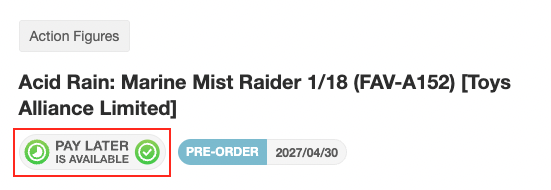
If the product page shows the “Pay Later is Available” logo, then the item is eligible for Pay Later.
How do I place a Pay Later order?
If the item is eligible for Pay Later, the Pay Later option will appear on the final checkout page under Step 5. Payment, as shown below.
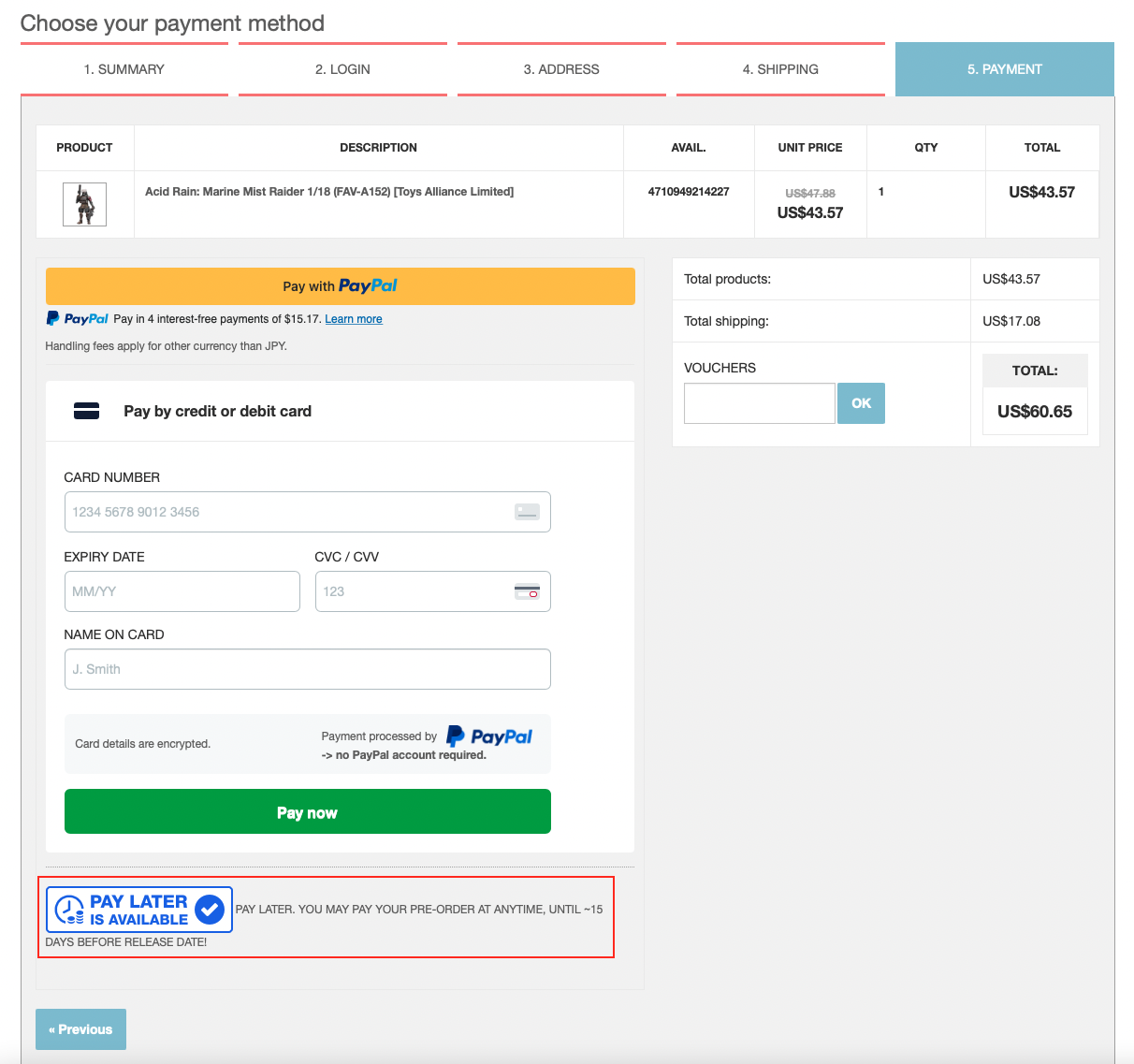
Important: To place the order as Pay Later, you must select the Pay Later option displayed at the bottom of the payment page.
Do not select PayPal, credit card, debit card, or any other immediate payment method if you want to place a Pay Later order.
If you complete payment using one of the regular payment methods shown above the Pay Later option, the order will be created as a normal paid order and not as a Pay Later order. This is important because a paid order cannot later be converted into a Pay Later order.
How do I pay for my Pay Later order?
You can pay for your Pay Later order from your Nin-Nin Game account under My Account → Order history and details.
Your Pay Later orders will show a “Pay now” button. Click this button to complete the payment before the deadline.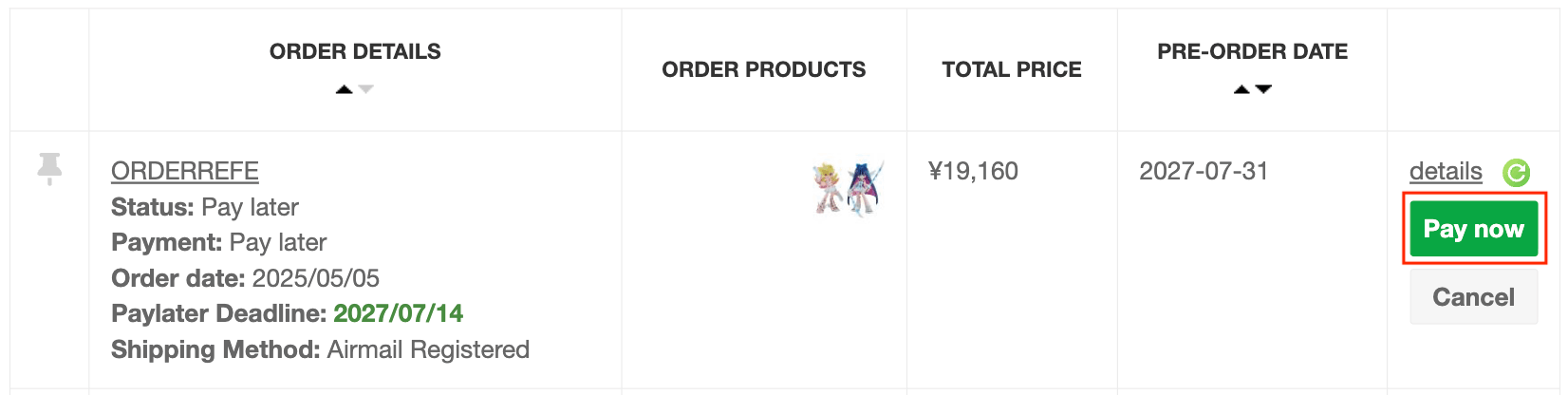
What is the Pay Later deadline?
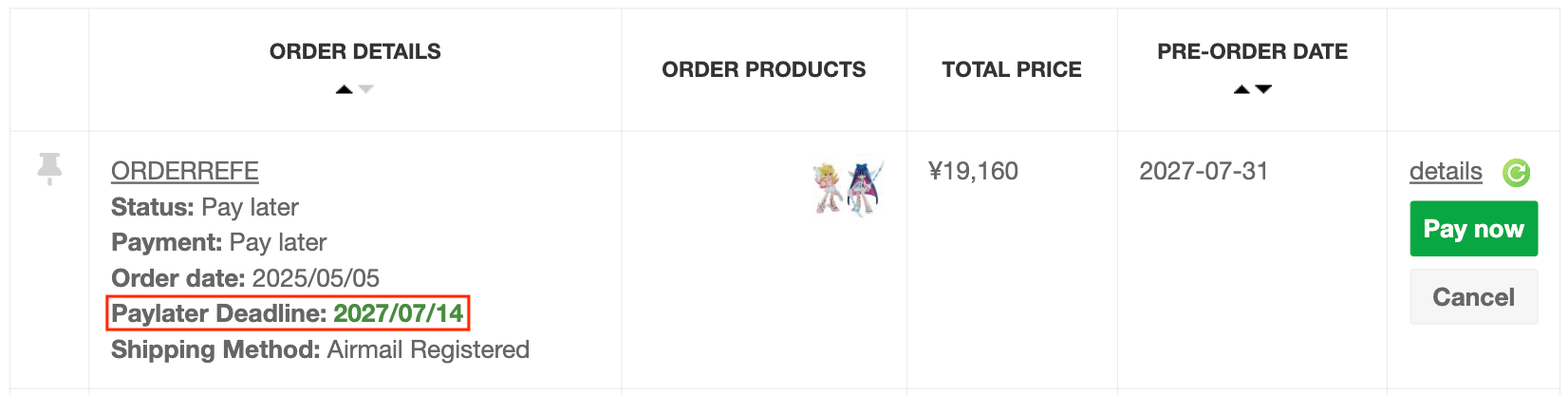
The Pay Later deadline is the 14th day of the item’s initial release month, Japan time, by 23:59. If payment is not completed by the deadline, the order will be cancelled automatically. The Paylater Deadline is also shown in your order details in your Order History.
Can I place and pay for a Pay Later order in another currency?
Yes, you can select any currency currently available on our website when placing your Pay Later order and again when completing the payment later.
However, the reference price of your Pay Later order is fixed in Japanese Yen (JPY) at the time the original order is placed. Changing the display or payment currency does not change this original JPY amount.
Why is the amount different when I pay for my Pay Later order?
The Japanese Yen (JPY) amount of your Pay Later order does not change after the order is placed. However, if you placed the order in another currency and later choose to pay in that same currency, the displayed amount may be different because the exchange rate may have changed since the original order date.
For example, if your Pay Later order was originally recorded at ¥10,000, it will remain ¥10,000. However, the equivalent amount shown in USD, EUR, or another currency may be higher or lower depending on the current exchange rate.
This means that the difference you may see is caused by currency conversion and does not mean that the price of your Pay Later order has been modified.
Can I use vouchers or loyalty codes on Pay Later orders?
Vouchers and loyalty codes can only be applied when placing a new order. They cannot be applied later when paying a Pay Later invoice.
What happens if I do not pay my Pay Later order by the deadline?
If you do not pay by the deadline, your order will be automatically cancelled. If the item is still available afterwards, you may place a new order normally.
Can I request an extension of the Pay Later deadline?
Unfortunately, no. We cannot extend Pay Later deadlines upon request.
Pay Later deadlines are tied to our stock reservation and order management system. Allowing individual deadline changes would affect stock allocation, payment processing, and fairness toward other customers who reserved the same product under the same conditions. For this reason, individual extensions are not available.
What happens if the pre-order release date is postponed?
In most cases, the Pay Later deadline does not change even if the manufacturer postpones the release date.
The payment deadline remains based on the item’s initial scheduled release month, unless we officially announce otherwise.
This is because we still need to secure your reservation with our supplier and maintain the same payment conditions for all customers who placed the same pre-order.
Unfortunately, we cannot make individual deadline exceptions in these cases.
Can I pay for only part of my Pay Later order?
No, we do not offer split payment for Pay Later orders. If your Pay Later order contains several items with different release dates, the entire order must be paid in full by the payment deadline of the item with the earliest original release month.
For example, if one item is scheduled for October and another for December, the full order must be paid by the October Pay Later deadline. The payment deadline is therefore not calculated separately for each item within the same order.
To keep the entire order reserved, the full amount must be paid in one transaction by that deadline. If full payment is not completed by the deadline, the order cannot be kept on hold.
Can I change the shipping method on a Pay Later order?
Yes, you may request a different shipping method for your Pay Later order before it is shipped. However, changing the requested shipping method does not automatically update the amount due on your Pay Later order.
The Pay Later order must still be paid in full by its deadline using the amount currently shown. The final shipping cost can only be recalculated when our warehouse prepares and packs the order for shipment, once the final parcel size and weight are known.
At that stage:
- If the new shipping method costs more, we will send you an invoice for the additional shipping difference.
- If the final shipping cost is lower, any remaining unused shipping balance can be refunded after the shipment cost has been confirmed.
This means that a shipping method change does not postpone or modify the Pay Later payment deadline.
I paid for my Pay Later order, but the status has not changed. Why?
In some cases, payment confirmation is not updated immediately.
This is particularly common with certain payment methods such as EBANX, where:
- some payment methods require additional time to be processed,
- cash-based payments are not confirmed until the customer has completed the payment locally,
- and once payment is received, our team may still need to validate it manually on our side.
Please also note that manual payment verification is handled on business days only and is not processed during weekends.
For Adyen bank transfers, processing can also take several business days and sometimes longer depending on the bank transfer method used.
If you have paid your Pay Later order, please wait a few business days before contacting us.
What if my Pay Later payment remains unpaid or unconfirmed for several business days?
If several business days have passed and there has still been no update, please contact Customer Service and provide:
- your Pay Later order reference,
- and, when available, your payment reference.
We will then review the payment status.
Can you resend my payment link or let me retry the same Pay Later payment?
In most cases, no. For EBANX orders, if the payment is not completed, the order will normally cancel automatically after the allowed period. A new payment link cannot be reissued.
For certain Adyen payment methods such as bank transfer, the payment instructions are sent automatically and cannot always be resent manually if the original email was missed.
If the payment was not completed and the order is cancelled, you will usually need to place a new order if the item is still available.
What happens if my payment status becomes “Payment Error”?
A “Payment Error” status usually means the payment was not successfully completed or could not be matched correctly to the order.
This may happen for several reasons, including:
- the payment flow was interrupted before completion,
- the transferred amount did not exactly match the order amount,
- the bank transfer information was incomplete or incorrect,
- or the payment was initiated but the funds were never successfully transferred.
In some cases, the order may still be manually validated during our next payment verification cycle if the payment was received correctly.
If the order remains in “Payment Error” after several business days, please contact us only if:
- you used a voucher and need it reinstated,
- or you hit a product purchase limit and need help placing a new order.
If the order has already changed to “Payment Error,” it is already considered cancelled. There is no need to contact us just to request cancellation.
What happens if my Pay now button disappears?
If the Pay now button disappears after the Pay Later deadline has passed, this means that the payment period has ended and the order can no longer be paid.
If the Pay now button disappears before the payment deadline, please contact Customer Service so our team can review the issue. Please include your 9-letter order reference and, if possible, a screenshot showing that the Pay now button is no longer available.
What happens if I cancel too many Pay Later orders?
The Pay Later option is intended for customers who genuinely plan to complete their purchases. It must not to be used simply to reserve items and decide later whether to keep them.
If an account shows frequent Pay Later cancellations or unpaid Pay Later orders, access to this payment option may be removed. Once Pay Later has been disabled, reinstatement is not guaranteed. In some cases, it may only be reconsidered after a significant period of time and depending on the customer’s overall order history.
We strongly recommend placing Pay Later orders only for items you are confident you will be able to pay for by the required deadline. In cases of serious or repeated abuse, for example, placing a large number of Pay Later orders without completing any purchases, Nin-Nin Game may take further action, including terminating the account and cancelling active orders.